Request tax exemption for US customers
 Security and navigation
NAVIGATION Home > Subscriptions & Billing > Request Tax Exemption
PERMISSIONS Admin or Billing and Purchasing role
For US customers, users with the Admin or Billing and Purchasing role can submit tax exemption certificates, including reseller certificates, directly through KaseyaOne in a streamlined, single sign-on (SSO) experience powered by CERTifyTax.
NOTE CERTifyTax is used for US customers only. To request a tax exemption for non-US customers, open a billing support ticket with the customer's PST/QST/RST numbers (Canadian customers) or VAT/GST numbers (other non-US customers). Refer to Submit a billing ticket.
Benefits of this feature include:
-
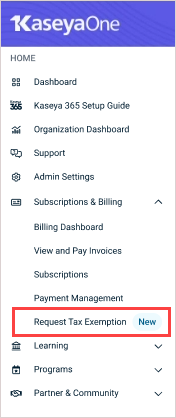
One-click, secure access: Click Request Tax Exemption under Subscriptions & Billing in the KaseyaOne left navigation menu to securely connect to CERTifyTax without needing to re-enter your credentials.
-
Faster processing: Your account information is automatically transferred, reducing manual entry and minimizing errors.
-
Audit and transparency: Every submission is logged for your records, ensuring transparency and security. Review your submission history at any time in CERTifyTax for compliance and audit purposes.
What you can see in the CERTifyTax portal
After submitting an exemption certificate, you can log in to the CERTifyTax customer portal to view the following information on your certificate record:
- Submitted exemption certificate
- Certificate and account details
- Certificate status
- Start date and end date, where applicable
- Reason for incompletion or correction needed, where applicable
Certificate statuses
After you upload an exemption certificate, CERTifyTax uses optical character recognition (OCR) and AI to validate it automatically. The process runs approximately every 15 minutes. During that time, your certificate may show as Pending. Once validation is complete, the status updates automatically based on the outcome.
The following statuses may appear on your certificate record:
| Status | Description |
|---|---|
| Pending | Your certificate has been uploaded and is awaiting automated OCR/AI review. This status typically clears within 15 minutes. |
| Active | Your certificate has been accepted and is complete and valid in CERTifyTax. No further action is required. Note that the portal displays Active rather than Accepted. These terms have the same meaning. |
| Incomplete | Your certificate was rejected and is not valid in CERTifyTax. Review the reason for incompletion or correction needed displayed on the certificate record, then resubmit corrected documentation. |
| Review | The automated OCR/AI process could not make a final determination about your certificate. Kaseya reviews the certificate manually and updates the status to Active or Incomplete. No action is required from you at this time. |
How to...
Request a tax exemption for US customers
NOTE This procedure applies to US customers only. Non-US customers can request a tax exemption by opening a billing support ticket. Refer to Submit a billing ticket.
-
Navigate to Subscriptions & Billing > Request Tax Exemption in KaseyaOne.
-
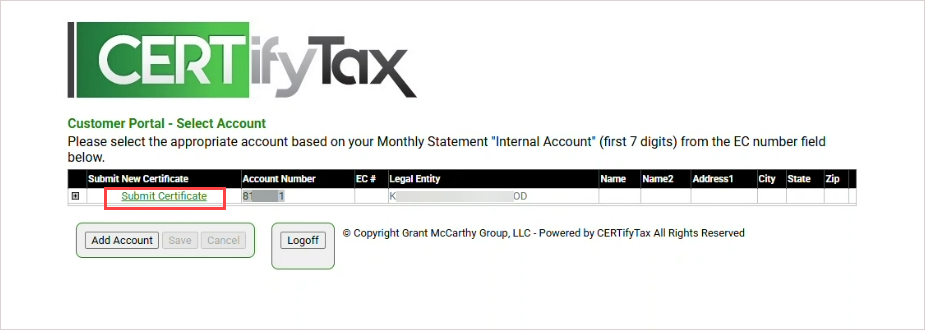
You are connected to the CERTifyTax application. Your account details (such as company name, address, Salesforce ID, and NetSuite ID) are pre-filled for convenience.
-
Click Submit Certificate.
-
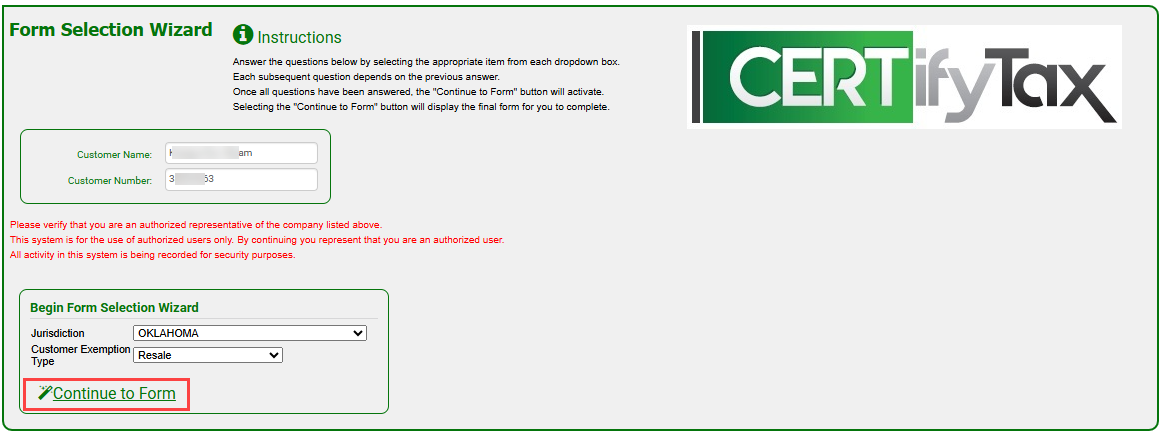
On the Form Selection Wizard page, select your jurisdiction and other items from each dropdown list, then click Continue to Form.
NOTE The dropdowns that display vary by the jurisdiction and exemption type you select.
-
On the Form Submission page:
Enter your email address.
Upload your exemption certificate or create a new one by completing all required fields.
Sign in the box below.
Click Save Form to submit the form.
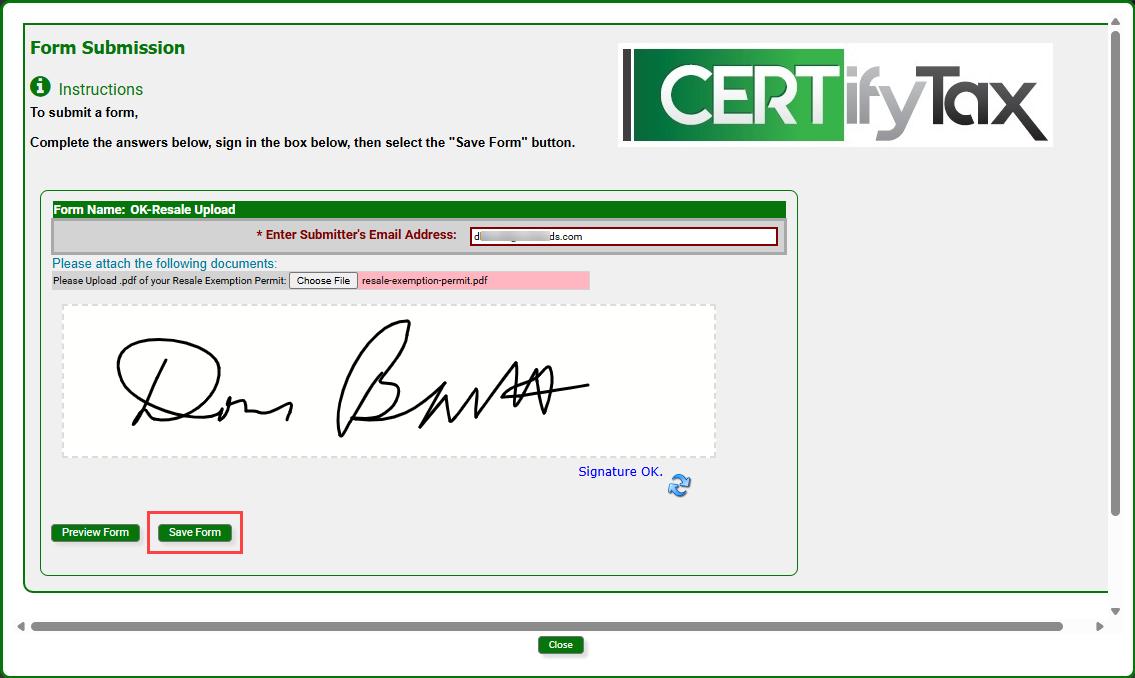
Your submission is complete. CERTifyTax validates your certificate automatically, typically within 15 minutes. To check the status of your submission, log in to the CERTifyTax customer portal and review your certificate record. For a description of each status, refer to Certificate statuses above.
Every submission is logged for your records. You can review your submission history at any time in CERTifyTax for compliance and audit purposes.
Check your exemption certificate status
To check the status of an exemption certificate you submitted, complete the following steps:
-
Log in to the CERTifyTax customer portal through KaseyaOne.
-
On the overview page, locate your exemption certificate record.
-
Review the Status field on the certificate record. For a description of each status, refer to Certificate statuses above.
If your certificate status is Incomplete, the reason for the rejection or correction needed is displayed on the record. Resubmit corrected documentation to resolve the issue.
FAQ
How long does it take for my certificate to be reviewed?
Automated validation typically runs within 15 minutes of submission.
CERTifyTax uses OCR and AI to validate exemption certificates. The process runs approximately every 15 minutes. During that window, your certificate displays a Pending status. If the automated process cannot make a determination, the status changes to Review and Kaseya reviews the certificate manually. No action is required from you while your certificate is under review.
Will I receive a notification when my certificate is accepted?
No automatic notification is currently sent when your certificate is accepted.
There is no automated outbound notification when your certificate moves to Active status. To confirm that your certificate was accepted, log in to the CERTifyTax customer portal through KaseyaOne and check the Status field on your certificate record.
My certificate status is Incomplete. What do I do?
Review the reason shown on the certificate record and resubmit corrected documentation.
When a certificate is marked Incomplete, CERTifyTax displays a reason for the rejection or correction needed on the certificate record in the portal. Review that reason, correct your certificate, and resubmit by following the steps in Request a tax exemption for US customers above.
I cannot access the CERTifyTax portal. What do I do?
Access the CERTifyTax portal through KaseyaOne. If you cannot access KaseyaOne, contact your KaseyaOne administrator.
The CERTifyTax portal is accessed through KaseyaOne. To access the portal, navigate to Subscriptions & Billing > Request Tax Exemption in KaseyaOne. If you have trouble accessing the portal, use the guidance below to determine the correct next step:
-
You cannot access KaseyaOne and you are the KaseyaOne administrator: Contact your Kaseya account manager for assistance.
-
You cannot access KaseyaOne and you are not the KaseyaOne administrator: Contact your KaseyaOne administrator for assistance.
-
You can access KaseyaOne but do not have the required permissions to access the CERTifyTax portal: Contact your KaseyaOne administrator for assistance.
Tax was applied to my invoice incorrectly. What do I do?
The next step depends on whether you have submitted an exemption certificate.
CERTifyTax manages exemption certificates, but invoice-specific tax issues may require a separate billing review. Use the guidance below to determine the correct next step:
-
You have not yet submitted an exemption certificate: Submit your exemption certificate through CERTifyTax first by following the steps in Request a tax exemption for US customers above. Exemption certificates are required before tax can be removed from your account.
-
You have already submitted an exemption certificate and believe tax was still applied incorrectly: Submit a support case for the Billing team to review. Refer to Submit a billing ticket.
-
Your question is about an incorrect tax rate or tax calculation: Submit a support case for the Billing team to review. Refer to Submit a billing ticket.
For general questions about US sales tax, where Kaseya US LLC is registered to collect sales tax, or whether a specific product or service may be taxable in your state, refer to Kaseya US tax FAQ or contact taxhelp@kaseya.com.
Can I request a tax exemption if I am not a US customer?
Yes, but the process is different for non-US customers.
The CERTifyTax integration in KaseyaOne is available for US customers only. If you are a non-US customer, open a billing support ticket and provide your PST/QST/RST numbers (Canadian customers) or VAT/GST numbers (all other non-US customers). Refer to Submit a billing ticket.


