Zoho IdP SSO setup instructions
 Security and navigation
NAVIGATION Header > Admin Settings > Single Sign-On
PERMISSIONS Admin role in KaseyaOne and an Administrator account in Zoho
Zoho is a cloud-based identity management service that allows you to access applications with single sign-on. This article guides you through how to integrate KaseyaOne with Zoho IdP. After successful integration, users will be able to access KaseyaOne from Zoho or from the KaseyaOne login page using Zoho credentials.
Supported features
- IdP-initiated SSO
- SP-initiated SSO
- Force users to log in with their SSO application (refer to Configure Enforce Log In with SSO in KaseyaOne).
- Just-in-time user provisioning (refer to Configure Enable Automatic User Creation for a third-party IdP SSO in KaseyaOne)
- Control access to KaseyaOne using your IdP group user assignments (refer to Configure third-party IdP Groups Access Control in KaseyaOne).
Prerequisites
- Admin user account in KaseyaOne and Administrator account in Zoho
- Users must have the same email address in KaseyaOne and Zoho
TIP Before you start, open two browser tabs – one for KaseyaOne and one for the Zoho Admin Portal. You will move between them during setup.
Step 1. Create and configure the KaseyaOne application in Zoho
- Open a browser and log in to KaseyaOne.
-
In a separate browser tab, log in to the Zoho Admin Portal as an administrator.
-
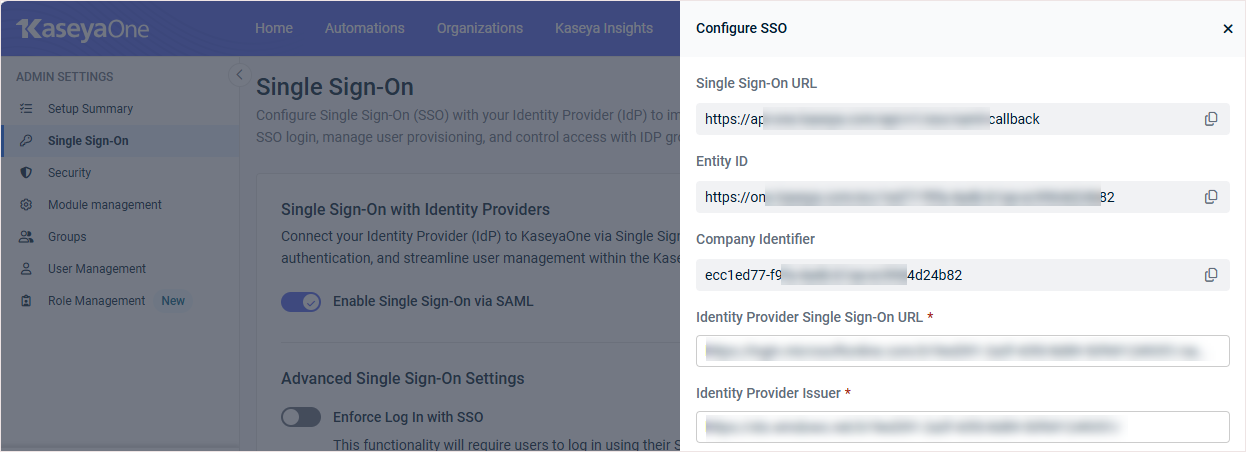
In Zoho, add your KaseyaOne Company Identifier by creating a custom field:
Go to the User Management > Manage Fields tab and click + Add a Custom Field.
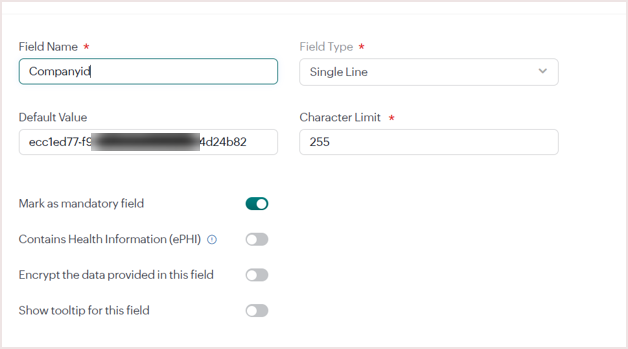
In the Add Custom Field dialog, enter the following information, and then save to add the custom field:
Field Name: enter Companyid
Field Type: select Single Line from the dropdown list
Default Value: enter your KaseyaOne Company Identifier
NOTE To obtain this identifier: in KaseyaOne, navigate to Admin Settings > Single Sign-On. In the Single Sign-On with Identity Providers tile, click Add Configuration. In the Configure SSO dialog that opens, copy the Company Identifier field value, then return to Zoho to enter it.
Character Limit: enter 255
Mark as mandatory field: turn on this toggle. Leave the other toggles turned off.
-
Go to App Management > Applications and click + Add Application.
-
On the Choose Application page, click Create Custom App.
-
Click New application on the next page, then click Create your own application.
-
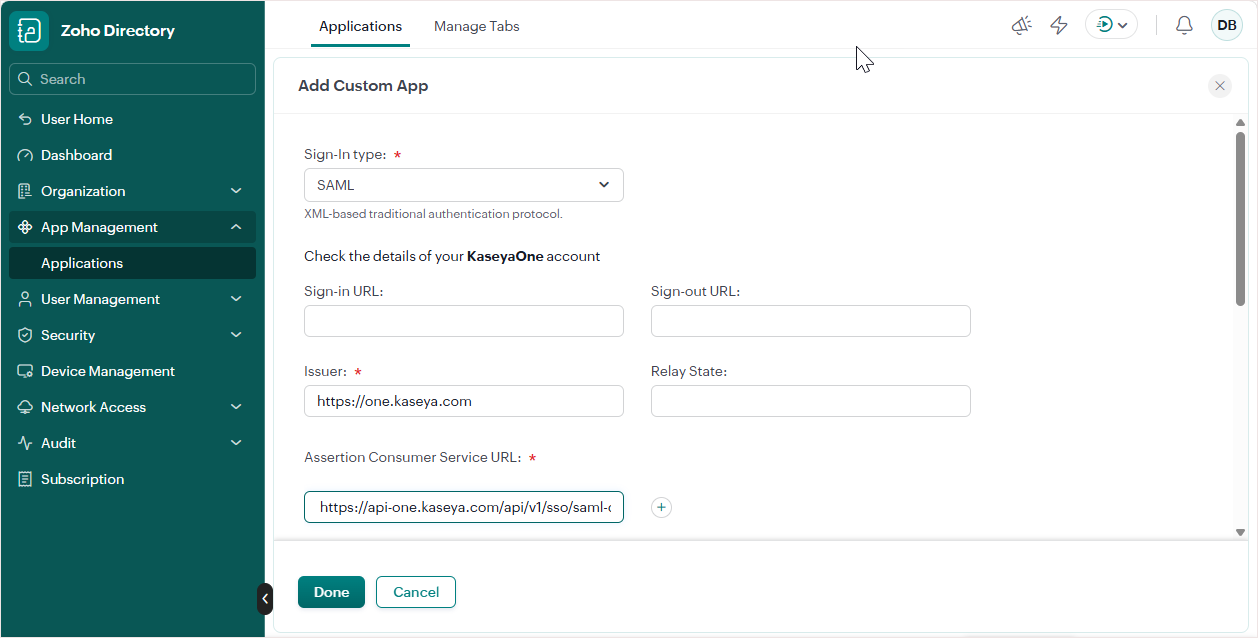
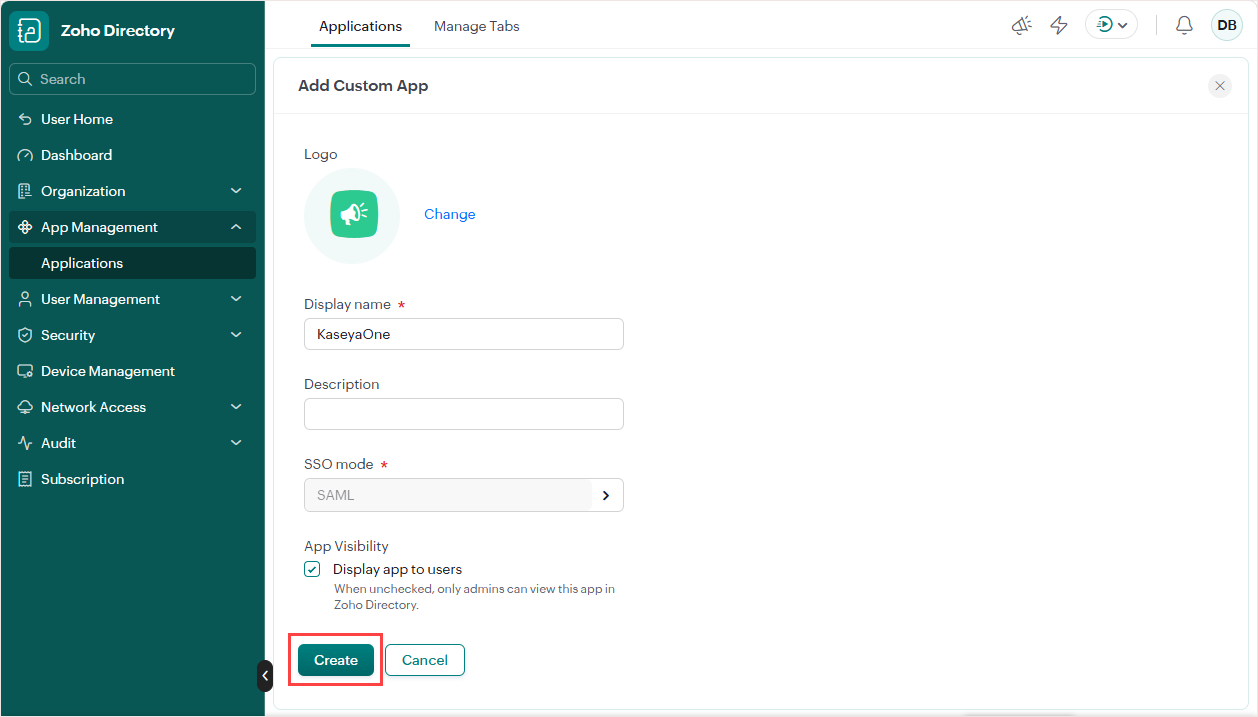
On the Add Custom App page, enter a Display name (e.g., KaseyaOne), then select an SSO Mode by clicking the arrow and entering the following required settings on the page that opens.
Enter these values in the section at the top of the page (and leave the other fields in this section empty):
Sign-in Type: select SAML from the dropdown list
Issuer: enter https://one.kaseya.com
NOTE If multi-tenancy is enabled in your Zoho environment, enter your KaseyaOne Entity ID in the Issuer field instead. To obtain this ID: in KaseyaOne, navigate to Admin Settings > Single Sign-On. In the Single Sign-On with Identity Providers tile, click Add Configuration. In the Configure SSO dialog that opens, copy the Entity ID field value, then return to Zoho to enter it.
Assertion Consumer Service URL: enter https://api-one.kaseya.com/api/v1/sso/saml-callback
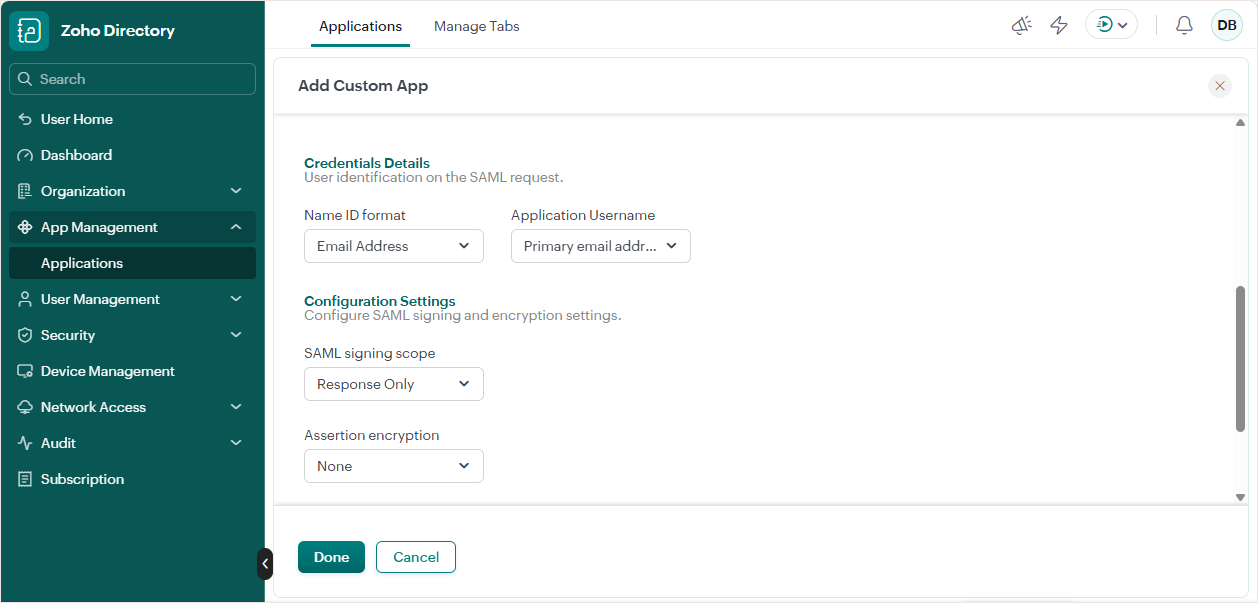
Use the default values in the Credentials Details section.
Select these values in the Configuration Settings section:
SAML signing scope: select Response Only from the dropdown list
Assertion encryption: select None from the dropdown list
Add these SAML attributes to the Attribute Mapping section:
| Attribute Name | Format | Attribute Value |
|---|---|---|
|
companyIdentifier |
Basic |
Companyid |
|
|
Basic |
Primary email address |
|
firstName |
Basic |
First name |
|
lastName |
Basic |
Last name |
|
userName |
Basic |
Primary email address |
|
securityGroups |
Basic |
Department |
NOTE The KaseyaOne companyIdentifier value comes from the custom field you created above. The userName value uses the primary email address, the same source as email. The securityGroups value comes from the user’s Zoho Department, which you will create in Step 3. Assign users to the KaseyaOne application in Zoho.
Click Done at the bottom of the page to save your SAML settings and return to the main Add Custom App page.
-
Click Create to add the KaseyaOne application.
-
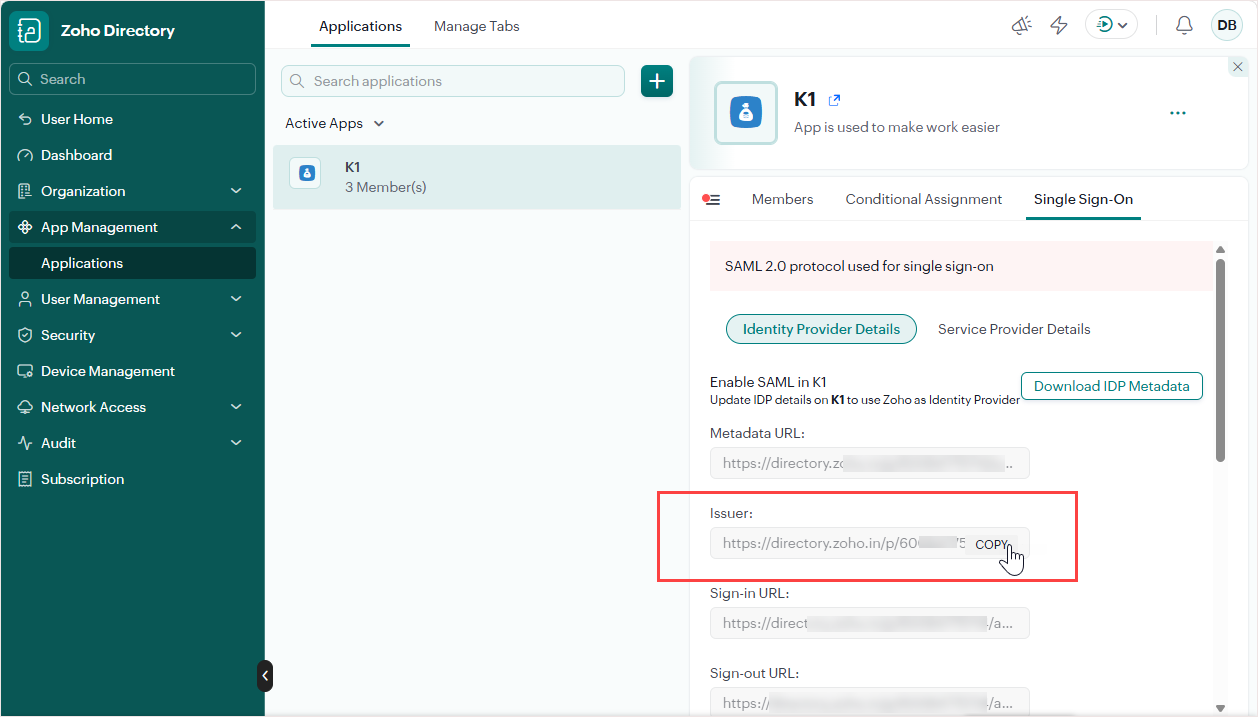
On the Applications page, click your KaseyaOne app. On the Single Sign-On tab:
Copy and save the Issuer value. You will need this value to add the Zoho SSO certificate to KaseyaOne.
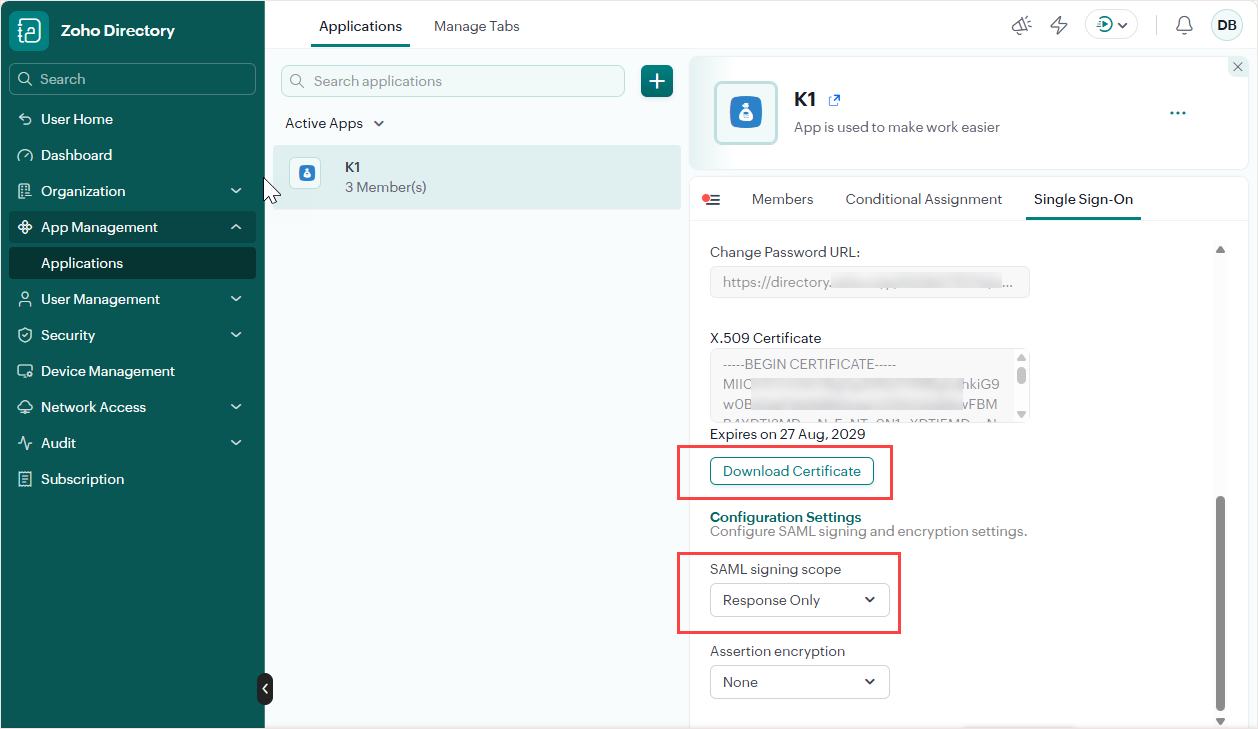
Scroll down to the bottom of the page. Ensure that Response Only is selected for SAML signing scope. Then download the certificate by clicking Download Certificate.
 Step 2. Configure SSO settings in KaseyaOne
-
In KaseyaOne, navigate to Admin Settings > Single Sign-On. In the Single Sign-On with Identity Providers tile, click Add Configuration.
-
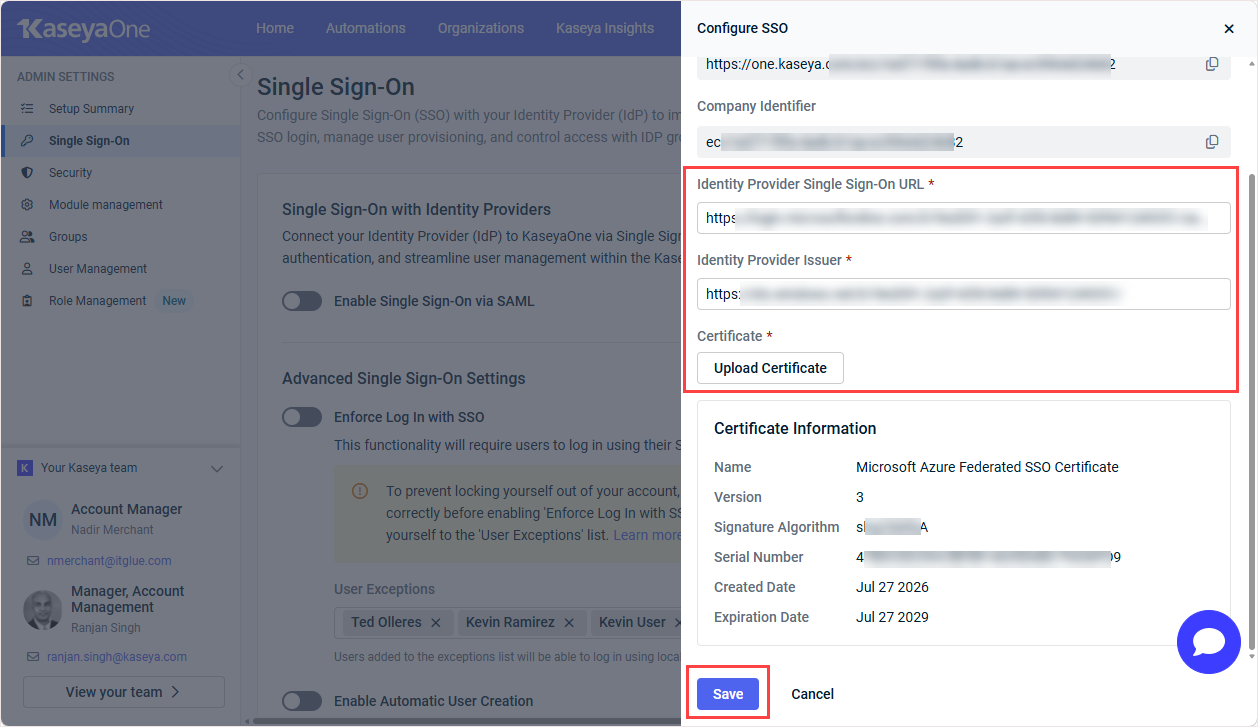
In the Configure SSO dialog that opens, enter the Zoho Issuer value you saved above into both of these fields: Identity Provider Single Sign-On URL and Identity Provider Issuer.
-
Click Upload. Browse to and upload the Zoho certificate. Click Save to save changes and close the Configure SSO dialog.
-
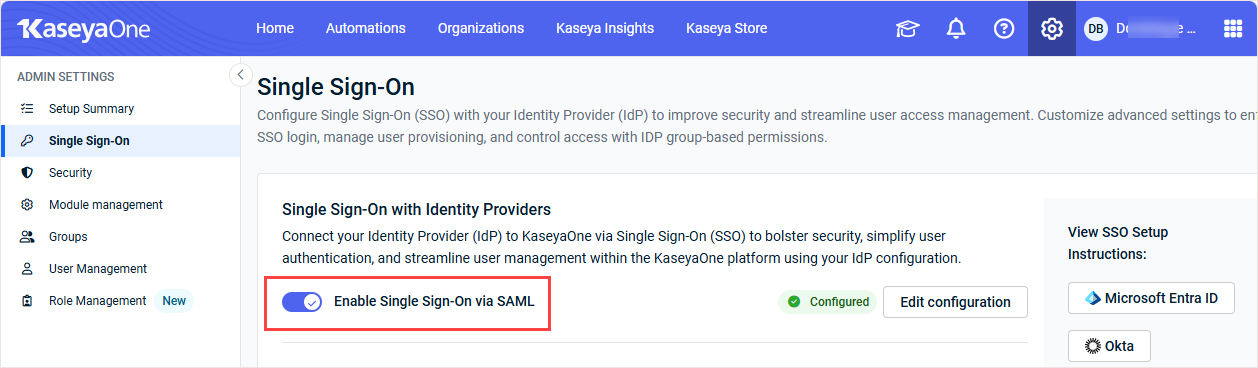
On the Single Sign-On page, turn on the Enable Single Sign-On via SAML toggle to enable SSO integration.
Step 3. Assign users to the KaseyaOne application in Zoho
-
In Zoho, go to User Management > Groups and click + Add Group.
-
On the Add Group page, add a new security group:
In the Group Info step, enter the group name and set the group type to Department. Click Continue.
NOTE Zoho sends the group name value to KaseyaOne in the securityGroups attribute.
In the Members step, assign an administrator as the Department Head, and add users to the group using the Moderators, Members, or Followers fields. Click Create Group.
The group is created and a confirmation message displays in the Summary step. Click Done to return to the Groups page.
-
Go to App Management > Application, and assign users to the KaseyaOne application.
NOTE Each user you assign must have the same email address in Zoho and KaseyaOne.
Step 4. Test your Zoho SSO integration
After you finish the configuration, test both login flows. Ensure that you have logged out of Zoho and KaseyaOne before running these procedures.
To test SSO via IdP-initiated login
-
Log in to Zoho.
-
Open the KaseyaOne application from the Zoho apps portal.
-
Confirm that you reach KaseyaOne without being prompted for KaseyaOne credentials.
To test SSO via SP-initiated login
-
Go to the KaseyaOne login page (https://one.kaseya.com).
-
Enter the Username and Company Name for your account and click Next.
-
Click Log In with Single Sign-On.
-
Confirm that you are redirected to Zoho to authenticate, and then returned to KaseyaOne.
Notes
-
Enter the Company Identifier in Zoho exactly as it appears in KaseyaOne (Admin Settings > Single Sign-On). An incorrect Company Identifier prevents users from signing in.
-
The supported SAML attributes are:
Name Value companyIdentifier KaseyaOne Company Identifier (from the Companyid custom field) Primary email address firstName First name lastName Last name userName Primary email address securityGroups The user’s Zoho Department


