Review transaction history
To review your transaction history:
-
In Kaseya Store, navigate to My Account > Billing > Transaction History.
-
On the Transaction History page that opens, a list of your past transactions displays.
Open: A credit has been issued and is available to be applied to your account.
Partially Applied: Part of the credit has been applied and there is a balance remaining that can be applied to another invoice.
Fully Applied: The credit has been fully applied (there is no remaining balance).
Unapproved Payment: The payment has been received and is currently being processed. Note that processing time for ACH, wire, and Go Cardless payments is 3-7 days.
Not Deposited: The payment has been received and applied to the relevant invoice(s).
Deposited: The payment has been successfully processed and completed.
-
You can opt to filter the list by entering a from/to date range and selecting one or more filter options.
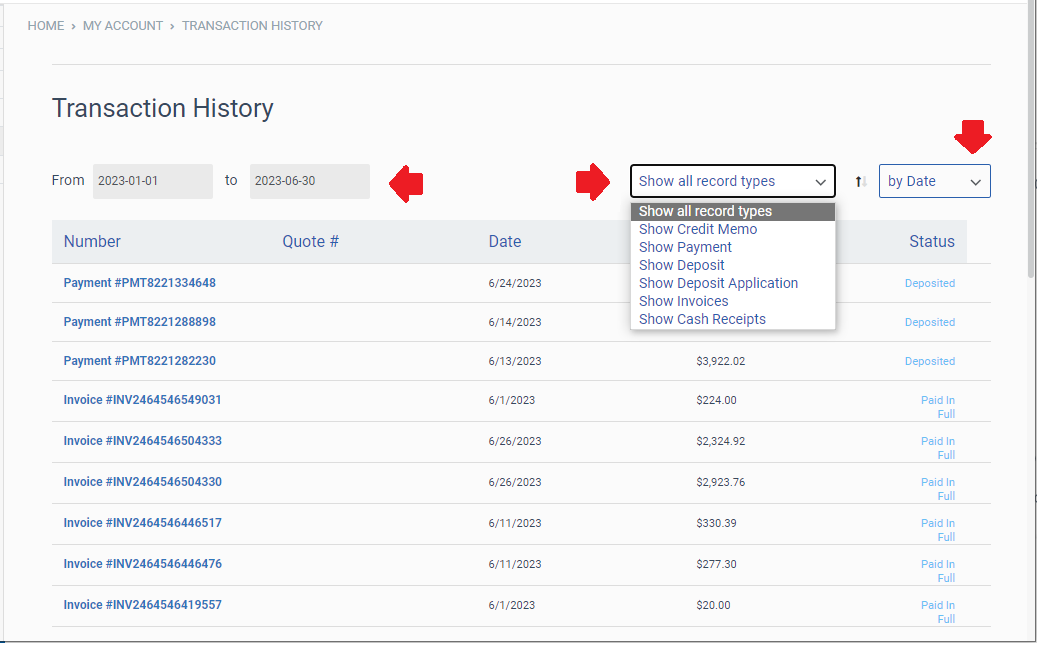
Select a record type:
Show all record types (default option)
Show Credit Memo
Show Payment
Show Deposit
Show Deposit Application
Show Invoices
Show Cash Receipts
Select a currency type:
All Currencies (default option)
A single currency type from the list. The list contains each currency that has been used in your transactions. Examples: GBP, USD, or EUR.
Select an option for how transactions are sorted:
by Date (default option)
by Number
by Amount


